sACN ⇄ Art-Net Bridge
A tiny, free tool that converts between sACN (E1.31) and Art-Net — in either direction, chosen per universe. Fix flaky multi-universe Art-Net output, or feed sACN gear from an Art-Net source.
Pure sockets — no Npcap, no Wireshark, no drivers. Just run it. Installer & all downloads →
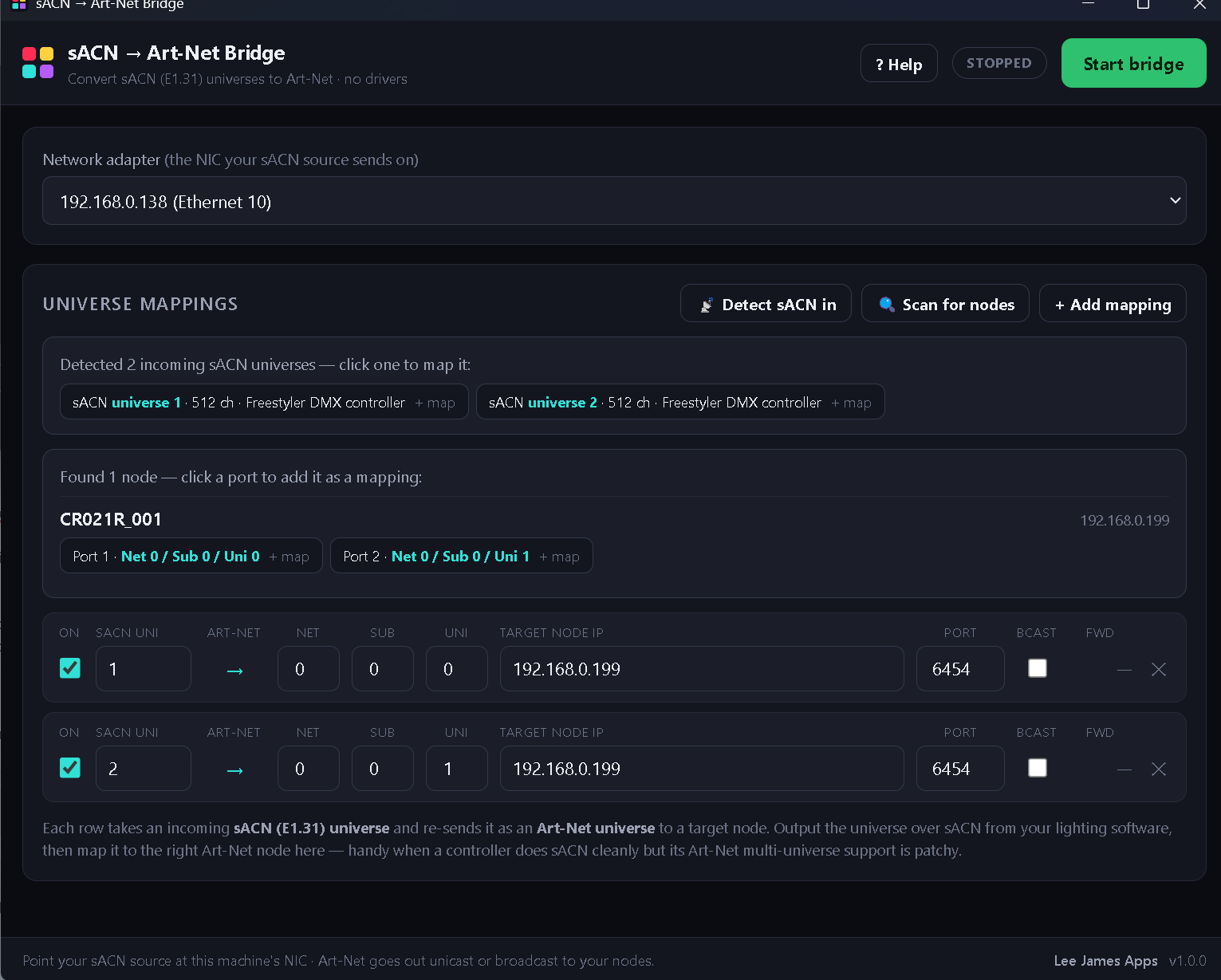
Pick a direction per universe, detect your sources, scan your nodes, hit Start — the whole thing on one screen.
Some lighting software handles one Art-Net universe fine but gets flaky with several — yet its sACN output works perfectly. Since both are just "DMX over the network", this app quietly translates one into the other — whichever way you need. Point the awkward universes at sACN and the Bridge sends them to your Art-Net nodes, or convert an incoming Art-Net source back to sACN. Mix directions freely, per universe. (If you found this from the FreeStyler forum — yes, this is the fix for its second-universe Art-Net.)
Everything it does
Both directions, per universe
Each mapping picks its own Direction — sACN → Art-Net or Art-Net → sACN. Run some rows each way at the same time; every universe is independent.
Detect sACN & Art-Net in
Listens on your network and lists the incoming sACN and Art-Net universes, then wires them into a mapping in a click. No guessing universe numbers.
Scan for nodes
Finds your Art-Net nodes automatically (ArtPoll) and fills in their IP and Net/Sub/Uni for you.
Unlimited mappings
Map as many universes as you like, each its own direction and target — unicast, broadcast or multicast per row.
Handles oddball hardware
Node addressed as Net / Sub / Uni just like its own menu, and a per-node port for the cheap ones that ignore 6454.
Live monitoring
Per-mapping forwarded-packet counters so you can see, at a glance, that data is actually flowing.
Light & portable
A single self-contained app — portable exe on Windows, signed & notarised on macOS. No dependencies, no config files to hand-edit. Settings just save.
Windows & macOS
The same app, the same mappings, on both. The macOS build is a universal binary — native on Apple silicon and Intel alike.
Up and running in under a minute
- 1Set your software to output sACN for the universes you want to bridge (E1.31, any universe).
- 2Detect & Scan. Hit Detect sACN in to grab the incoming universes, and Scan for nodes to grab your Art-Net gear.
- 3Press Start. The forwarded-packet counters climb and your nodes light up. That's it.
Download
Free, for Windows & macOS. Version 1.1.2 (macOS 1.1.1).
Windows: the build is code signed as Hi-Lite Entertainment Limited, so Windows names the publisher instead of “Unknown publisher”. SmartScreen earns trust from download numbers, so a newly issued signature can still show a warning for a while — if it does, choose More info → Run anyway. macOS: the build is signed with a Developer ID and notarised by Apple, so it opens normally — on first launch, allow it access to your Local Network when asked, or it can’t send or receive lighting data.
Smartshow LMS — LED Matrix Server
If you drive LED matrices or pixel walls, this is the bigger sibling: a modern, cross-platform LED matrix server — a full Scenes / Chases / Show Mode pipeline, 30+ effects, your own GLSL and ISF shaders, six output protocols, and external control over Art-Net / sACN / OSC / MIDI. It maps any shape of rig, not just rectangles.
Windows, macOS & Linux · version 1.0.1 — free, no account and no licence key.
Take a look — smartshowlms.leejamesapps.co.uk →